How to automate WhatsApp messages for business
A practical guide to automating WhatsApp for business: bot flows, auto-replies, broadcasts and follow-ups that save time and convert more leads.
Automating WhatsApp does not mean replacing people. It means making sure the routine messages — the instant welcome, the qualifying questions, the reminder, the follow-up — go out on time, so your team can focus on real conversations.
This guide covers the four kinds of WhatsApp automation that matter for sales teams and how to set them up responsibly.
Four kinds of WhatsApp automation
- Bot flows. Greet new chats, ask a few questions and route the chat to the right person.
- Auto-replies. Respond instantly to a keyword or outside working hours.
- Broadcasts. Send approved templates to a chosen group, such as past enquiries.
- Triggered follow-ups. Send a template or create a follow-up when something happens in your CRM.
- Hand-off rules. Stop the bot as soon as a person takes over.
- Opt-out handling. Respect customers who ask not to receive messages.
Start with the rules WhatsApp sets
Business messaging on WhatsApp runs through the WhatsApp Business Platform. Within 24 hours of a customer’s last message you can reply freely; outside that window, you can only send templates that Meta has approved. Broadcasts and automated follow-ups therefore use templates. Meta charges for conversations, separately from any software you use.
Only message people who have agreed to hear from you, and make it easy to opt out. Good automation protects your number’s reputation.
Build a bot flow that qualifies and hands over
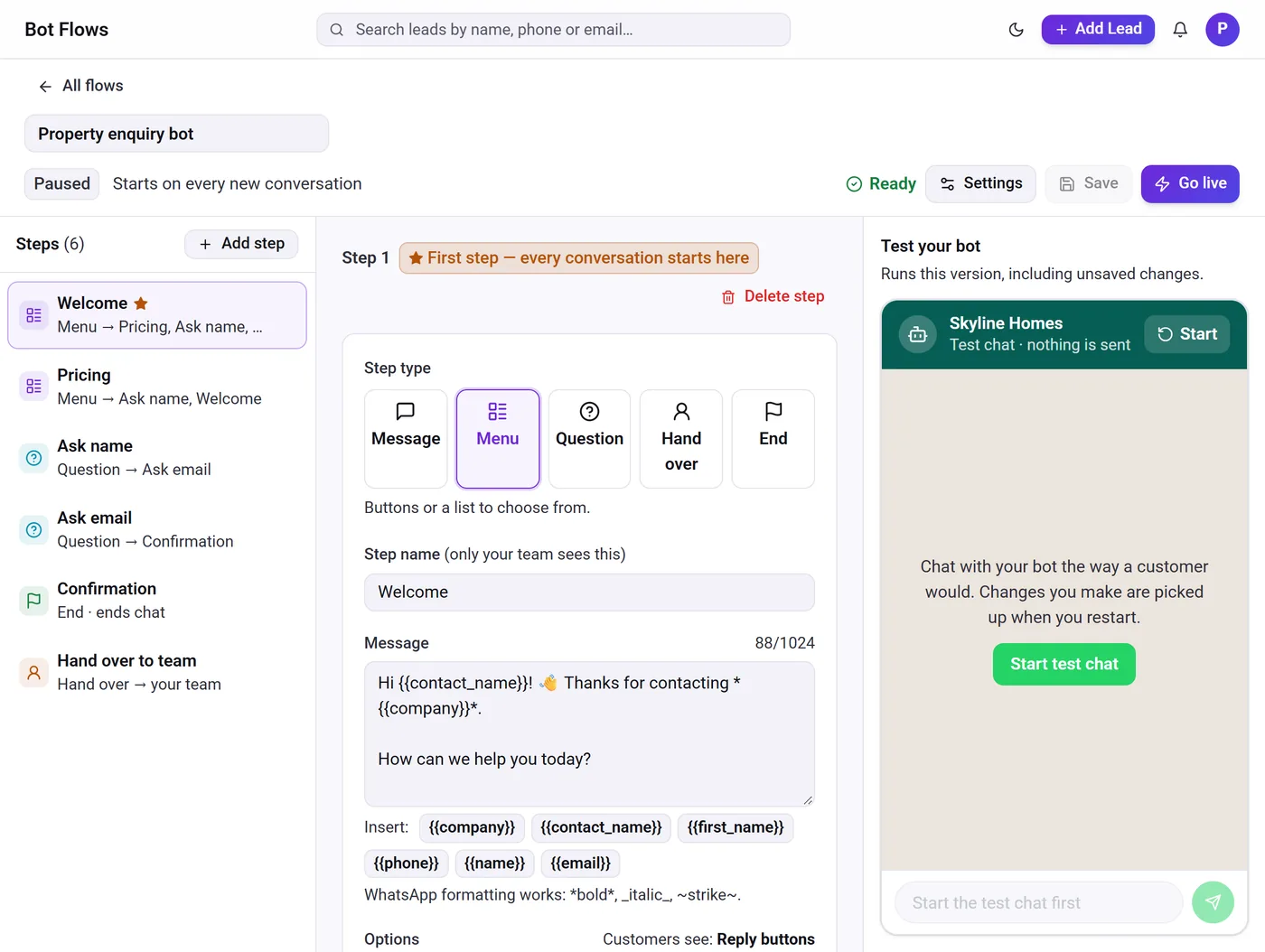
A good first bot does three things: welcomes the customer, asks two or three questions that help your team (what they need, budget, city), and hands over to a person. Keep menus short — buttons for up to three options, a list for more — and validate answers such as email addresses. Always offer a way to reach a person.
Test the flow before switching it on. In Telemantix, the bot builder includes a test chat, and answers are saved on the lead so the salesperson sees them immediately.
Automate follow-ups from your CRM
The most valuable automation is often not a bot but a rule: when a new lead arrives, assign it and create a call follow-up; when a lead has not replied for three days, create a task; when a follow-up is missed, alert the manager; when a lead reaches a stage, send an approved template. These rules keep leads moving without anyone remembering to do it.
- New lead → assign and create a follow-up
- No reply in N days → re-engagement task
- Stage reached → send an approved template
How to set up WhatsApp automation
- Connect the WhatsApp Business PlatformUse your business number with a tool that supports the official platform.
- Create approved templatesWrite templates for welcome, reminder and follow-up messages and submit them to Meta.
- Build and test a botKeep it short, test every path and make hand-off easy.
- Add CRM rulesAutomate assignment, follow-ups and alerts, and review them monthly.
Frequently asked questions
Can I automate WhatsApp with a normal WhatsApp account?
Business automation such as bots, broadcasts and API-based messages runs on the WhatsApp Business Platform, not on personal accounts.
Do automated WhatsApp messages cost money?
Meta charges for business conversations according to its pricing. Software fees, if any, are separate.
Will a bot annoy my customers?
Not if it is short, useful and hands over to a person quickly. Stop the bot as soon as someone from your team replies.
What should I automate first?
Start with an instant welcome and lead assignment with a follow-up. Those two steps prevent the most lost leads.