
WhatsApp chatbot builder that qualifies leads inside your CRM
The first reply often decides whether a lead stays interested. A WhatsApp bot can answer in seconds, ask the questions your team would ask, and pass the conversation to a salesperson with the answers already saved. In Telemantix, bot flows are built into the CRM, so every answer lands on the lead.
You build flows step by step without code, test them in a live preview, and switch them on when you are ready.
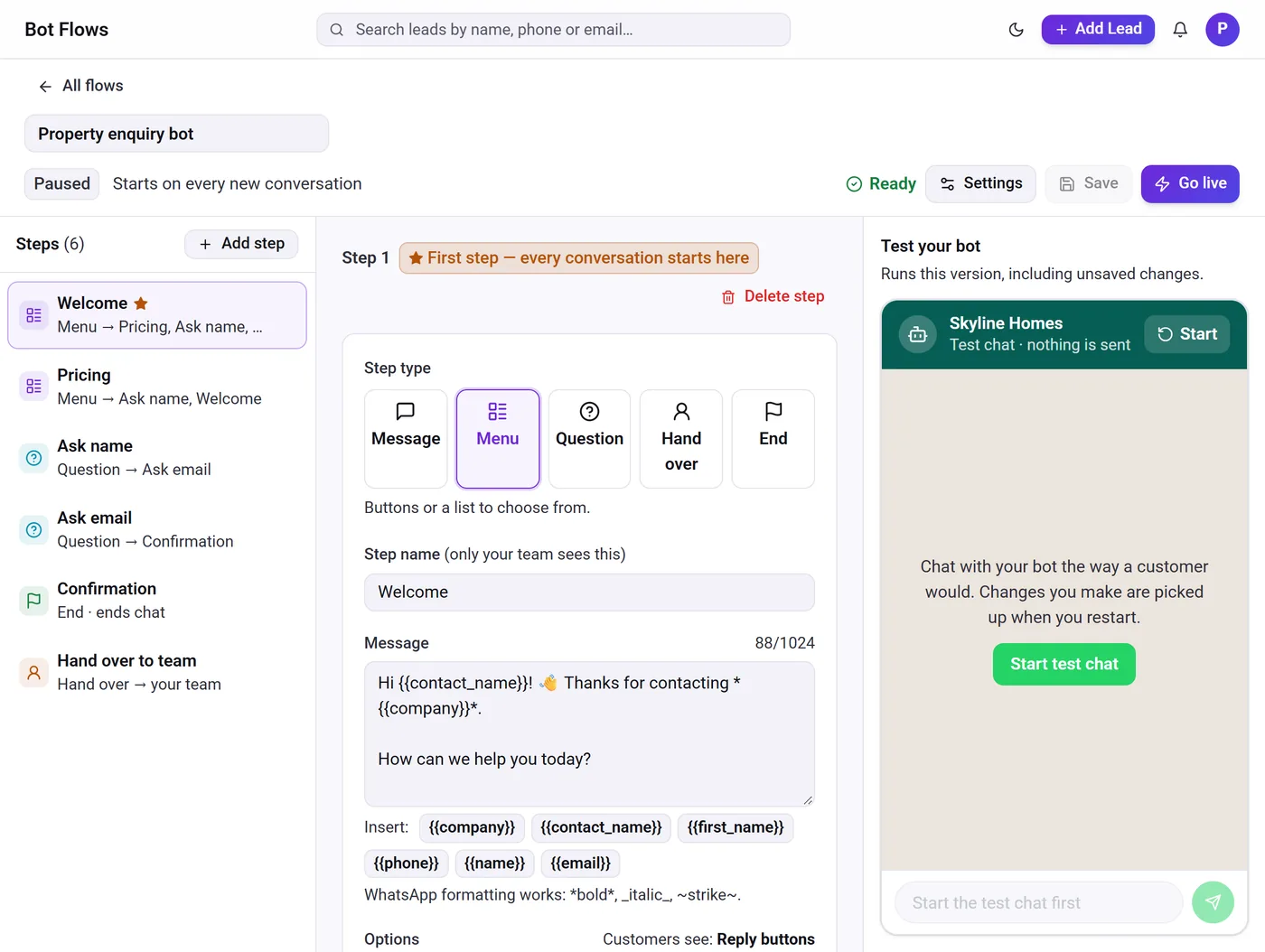
What the WhatsApp bot builder can do
Menus with buttons or lists
Offer up to three reply buttons or a list of up to ten options.
Questions with validation
Ask for a name, email, budget or city and check the answer before moving on.
Answers saved to the lead
Replies are stored on the lead record, or used to create a new lead.
Hand-off to your team
Route the chat to a person at any step, or when a customer types a keyword like “agent”.
Test before going live
Try the whole flow in a test chat inside the builder; nothing is sent to customers.
Start from a template
Begin with lead qualification, support triage or appointment templates and edit them.
WhatsApp automation software that knows when to step back
A good bot helps customers without getting in the way. Telemantix bots stay quiet after one of your team replies or a campaign message is sent, retry politely when an answer does not fit, and hand the chat to a person after a set number of attempts. You decide how long before a returning customer sees the flow again.
Flows can start on every new conversation or only when a customer sends a keyword, so you can run a general welcome flow and still handle specific campaigns.
A CRM with chatbot built in, not a separate tool
Stand-alone chatbot tools collect answers in their own dashboard, and someone has to copy them into the CRM. In Telemantix the bot is part of the CRM: it can create the lead, save the answers, and hand the conversation to the assigned salesperson, who sees everything in the shared inbox.
Bots run on your own number on the official WhatsApp Business Platform. Bot flows are available with WhatsApp, according to your plan.
- Message, menu, question, hand-off and end steps
- Keyword triggers and a restart window
- Paused by default until you switch it on
How to build a WhatsApp bot flow
Pick a template or start blank
Choose a ready-made flow or build your own from steps.
Add your questions and menus
Write the messages, add buttons or lists, and choose where each answer leads.
Test in the preview
Chat with the bot inside the builder to check every path.
Go live
Switch the flow on for new conversations or for a keyword.
Frequently asked questions
Do I need coding skills to build a WhatsApp bot?
No. Flows are built from steps in a visual editor, and you can test them in a preview chat before going live.
Can the bot hand the chat to a person?
Yes. Any step can hand over to your team, customers can type a keyword to reach a person, and the bot hands over automatically after repeated unclear answers.
Where are the bot’s answers stored?
On the lead record in Telemantix. If the customer is new, the bot can create the lead.
Does the bot reply after my team has taken over?
No. The bot stays quiet after your team or a campaign has messaged the customer, for the restart window you choose.
Explore more
Answer every WhatsApp enquiry in seconds
Build a bot that qualifies leads and hands them to your team with the answers saved.